Project Introduction:
This project demonstrates my leadership in crafting a cutting-edge Pet Care Revolution through the development of a sophisticated Pet Healthcare Recommendation Chatbot. Fueled by a passion for animal well-being, this endeavor signifies the convergence of advanced technologies, meticulously curated algorithms, and a forward-looking approach, aimed at reshaping the landscape of pet care. With a focus on leveraging cutting-edge technology to address the diverse healthcare needs of pets, this project introduces a revolutionary approach to providing timely and personalized healthcare recommendations. The primary objective of the Pet Healthcare Recommendation Chatbot is to offer pet owners a user-friendly and intelligent platform for seeking healthcare guidance tailored to their specific pets. By employing advanced natural language processing (NLP) and machine learning techniques, the chatbot interprets user input and matches it with a comprehensive database of symptoms and diseases across various animal categories.
Key Technologies:
Tkinter GUI Framework:
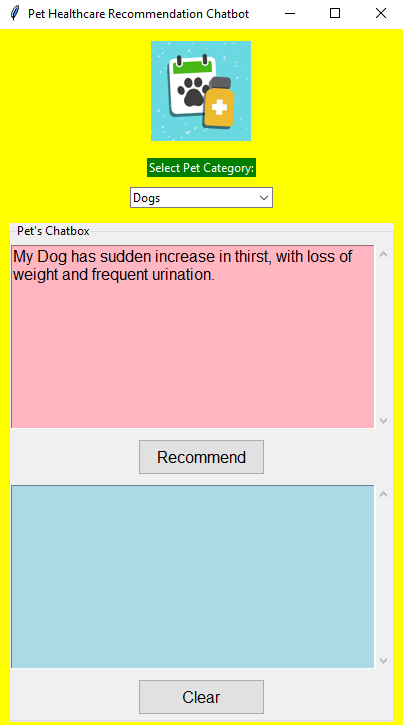
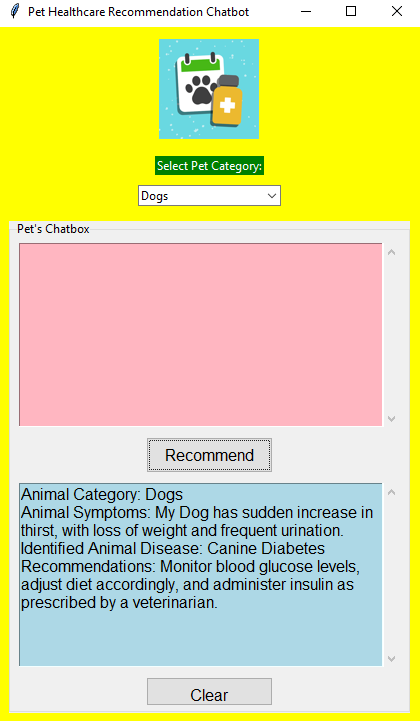
Crafted an intuitive Graphical User Interface using Tkinter, providing users with a seamless and visually appealing experience. This framework forms the foundation for effortless navigation and interaction.
NLTK (Natural Language Toolkit):
NLTK, a natural language processing powerhouse, employs techniques like tokenization and lemmatization to enhance symptom analysis accuracy. Scikit-learn's TfidfVectorizer and cosine similarity calculations play pivotal roles in identifying and recommending tailored healthcare solutions for pets.
ScrolledText Widget:
The inclusion of the ScrolledText Widget and dynamic use of ImageTk bring a scrollable and visually appealing element to the chat interface. Users can navigate through recommendations, interact with the chatbox, and enjoy a touch of color with a vibrant pink Clear button, adding flair to the user interface.
Scikit-learn:
Integrated TfidfVectorizer and cosine similarity algorithms from Scikit-learn to enhance the recommendation engine's accuracy in identifying relevant healthcare solutions.
Pandas:
Utilized Pandas for efficient data manipulation, ensuring streamlined handling and organization of information to bolster the application's data management capabilities.
TF-IDF (Term Frequency-Inverse Document Frequency):
Employs advanced text representation techniques to match pet symptoms with potential diseases and recommend personalized healthcare solutions, incorporates TF-IDF algorithms to calculate the similarity between user-input symptoms and predefined symptoms of various pet diseases. By extracting essential features from the text and employing cosine similarity metrics, the chatbot identifies the most probable pet disease, providing users with valuable insights.
Scope and Future Enhancements:
The scope of this project extends beyond its current capabilities. Future enhancements may involve incorporating deep learning models for more accurate symptom-disease matching, expanding the database to include a broader range of pet health issues, and integrating real-time data for dynamic and evolving recommendations. The project lays the groundwork for a comprehensive and adaptive pet healthcare ecosystem.
import tkinter as tk
from tkinter import ttk, scrolledtext
from PIL import Image, ImageTk
from nltk.corpus import stopwords
from nltk.tokenize import word_tokenize
from nltk.stem import WordNetLemmatizer
from sklearn.feature_extraction.text import TfidfVectorizer
from sklearn.metrics.pairwise import cosine_similarity
import nltk

# Initializes NLTK and download necessary resources
nltk.download('punkt')
nltk.download('stopwords')
nltk.download('wordnet')

# Sample animal healthcare recommendations (generic)
animal_disease_recommendations = {
    "Common Cold (Cats)": "Keep the cat warm, provide plenty of fluids, and monitor for any worsening symptoms. Consult a veterinarian if needed.",
    "Influenza (Cats)": "Isolate the cat, maintain proper hygiene, and monitor for any respiratory distress. Consult a veterinarian if symptoms persist.",
    "Feline Diabetes": "Monitor blood glucose levels, adjust diet accordingly, and administer insulin as prescribed by a veterinarian.",
    "Upper Respiratory Infections (Cats)": "Provide a warm and quiet environment, encourage hydration, and consult a veterinarian for supportive care.",
    "Parvovirus (Dogs)": "Isolate the dog, maintain hydration through intravenous fluids, and seek immediate veterinary attention.",
    "Canine Diabetes": "Monitor blood glucose levels, adjust diet accordingly, and administer insulin as prescribed by a veterinarian.",
    "Kennel Cough (Dogs)": "Isolate the dog, provide supportive care, and consult a veterinarian for appropriate treatment.",
    "Psittacosis (Birds)": "Isolate the bird, provide a warm and quiet environment, and consult an avian veterinarian for diagnosis and treatment.",
    "Common Respiratory Issues (Birds)": "Maintain proper humidity levels, provide a balanced diet, and consult an avian veterinarian for respiratory support.",
    "Rabbit Snuffles": "Isolate the rabbit, keep the environment clean, and consult a veterinarian for appropriate antibiotics.",
    "Hamster Respiratory Infections": "Maintain a warm and stress-free environment, provide a balanced diet, and consult a veterinarian for respiratory support.",
    "Fish Health Conditions": "Maintain optimal water conditions, monitor for any signs of disease, and consult a fish veterinarian for appropriate treatment.",
    "Mouse Health Concerns": "Ensure a well-balanced diet, provide a clean habitat, and consult a veterinarian for any signs of illness."
}

# Function to provide recommendations based on animal disease
def get_animal_recommendations(animal_disease):
    return animal_disease_recommendations.get(animal_disease, "Recommendations not available for this animal disease.")

# Function to preprocess text data for animals
def preprocess_animal_text(text):
    stop_words = set(stopwords.words('english'))
    lemmatizer = WordNetLemmatizer()
    tokens = word_tokenize(text.lower())
    filtered_tokens = [lemmatizer.lemmatize(token) for token in tokens if token.isalnum() and token not in stop_words]
    return ' '.join(filtered_tokens)
# Function to clear the chat output
def clear_chat_output():
    animal_chat_output.config(state=tk.NORMAL)
    animal_chat_output.delete("1.0", tk.END)
    animal_chat_output.config(state=tk.DISABLED)

# Function to recommend animal disease and healthcare solutions
def recommend_animal_disease_and_solutions(animal_category, animal_symptoms):
    # Sample animal diseases and their associated symptoms for Cats, Dogs, Birds, Rabbits, Hamsters, Cow, Fish, and Mouse
    animal_diseases = {
        "Cats": {
            "Common Cold": ["sneezing", "runny nose", "lethargy","cold", "cough"],
            "Influenza": ["fever", "cough", "loss of appetite", "not eating","weak"],
            "Feline Diabetes": ["increased thirst", "frequent urination", "weight loss"],
            "Upper Respiratory Infections": ["sneezing", "nasal discharge", "cough"]
        },
        "Dogs": {
            "Parvovirus": ["vomiting", "diarrhea", "lethargy"],
            "Canine Diabetes": ["increased thirst", "frequent urination", "weight loss"],
            "Kennel Cough": ["cough", "sneezing", "nasal discharge", "cold"]
        },
        "Birds": {
            "Psittacosis": ["lethargy", "nasal discharge", "difficulty breathing", "cough"],
            "Common Respiratory Issues": ["sneezing", "coughing", "difficulty breathing"]
        },
        "Rabbits": {
            "Rabbit Snuffles": ["nasal discharge", "sneezing", "lethargy", "cough", "cold"]
        },
        "Hamsters": {
            "Hamster Respiratory Infections": ["sneezing", "labored breathing", "lethargy", "cough", "cold"]
        },
                "Fish": {
            "Fish Health Conditions": ["abnormal swimming behavior", "loss of appetite", "fin damage"]
        },
        "Mouse": {
            "Mouse Health Concerns": ["hair loss", "unexplained weight loss", "labored breathing","weak","vomiting"]
        }
    }

    # Preprocess animal symptoms
    animal_symptoms = preprocess_animal_text(animal_symptoms)

    # Calculates TF-IDF vectors for animal diseases and symptoms based on the selected category
    tfidf_vectorizer = TfidfVectorizer()
    animal_disease_vectors = tfidf_vectorizer.fit_transform([' '.join(symptoms) for symptoms in animal_diseases[animal_category].values()])
    animal_symptoms_vector = tfidf_vectorizer.transform([animal_symptoms])

    # Calculate cosine similarity between animal symptoms and disease symptoms
    similarities = cosine_similarity(animal_symptoms_vector, animal_disease_vectors)

    # Identify the animal disease with the highest similarity
    max_similarity_index = similarities.argmax()
    animal_disease = list(animal_diseases[animal_category].keys())[max_similarity_index]

    # If no disease matches the symptoms
    if similarities.max() < 0.2:
        return None, "None, your pet seems healthy!"

    # Get recommendations for the identified animal disease
    animal_recommendations = get_animal_recommendations(animal_disease)

    return animal_disease, animal_recommendations

# Function to handle the chat interaction for animals
def animal_chat():
    animal_category = animal_category_var.get()
    animal_symptoms = animal_input_text.get("1.0", "end-1c")
    animal_disease, animal_recommendations = recommend_animal_disease_and_solutions(animal_category, animal_symptoms)
    animal_chat_output.config(state=tk.NORMAL)
    animal_chat_output.insert(tk.END, f"Animal Category: {animal_category}\n")
    animal_chat_output.insert(tk.END, f"Animal Symptoms: {animal_symptoms}\n")
    animal_chat_output.insert(tk.END, f"Identified Animal Disease: {animal_disease}\n")
    animal_chat_output.insert(tk.END, f"Recommendations: {animal_recommendations}\n\n")
    animal_chat_output.config(state=tk.DISABLED)
    animal_input_text.delete("1.0", tk.END)

# Creates the main window for animal healthcare recommendations
animal_root = tk.Tk()
animal_root.title("Pet Healthcare Recommendation Chatbot")

# Sets background color for animal healthcare recommendations
animal_background_color = "yellow"  # Yellow background color
animal_root.configure(bg=animal_background_color)

# Loads and displays an animal healthcare logo
animal_logo_image = Image.open("animal_healthcare_logo.png")  # Animal healthcare logo image file path
animal_logo_image = animal_logo_image.resize((100, 100))  # Resizes the animal healthcare logo as needed
animal_logo_image = ImageTk.PhotoImage(animal_logo_image)
animal_logo_label = tk.Label(animal_root, image=animal_logo_image, bg=animal_background_color)
animal_logo_label.pack(pady=10)

# Animal Category UI
animal_category_label = ttk.Label(animal_root, text="Select Pet Category:", foreground="white", background="green")
animal_category_label.pack(pady=5)

animal_categories = ["Cats", "Dogs", "Birds", "Rabbits", "Hamsters", "Cow", "Fish", "Mouse"]
animal_category_var = tk.StringVar(animal_root)
animal_category_var.set(animal_categories[0])
animal_category_menu = ttk.Combobox(animal_root, textvariable=animal_category_var, values=animal_categories)
animal_category_menu.pack(pady=5)

# Chat UI
animal_chat_frame = ttk.LabelFrame(animal_root, text="Pet's Chatbox")
animal_chat_frame.pack(padx=10, pady=10, fill="both", expand="yes")

# Chat input
animal_input_text = scrolledtext.ScrolledText(animal_chat_frame, wrap=tk.WORD, width=40, height=10, font=("Arial", 12), background="lightpink")
animal_input_text.pack(pady=5)

# Chat button
animal_chat_button = ttk.Button(animal_chat_frame, text="Recommend", command=animal_chat, style="TButton")
animal_chat_button.pack(pady=5)

# Chat output
animal_chat_output = scrolledtext.ScrolledText(animal_chat_frame, wrap=tk.WORD, width=40, height=10, state=tk.DISABLED, font=("Arial", 12), background="lightblue")
animal_chat_output.pack(pady=5)

# Clear button
clear_button = ttk.Button(animal_chat_frame, text="Clear", command=clear_chat_output, style="TButton")
clear_button.pack(pady=5)

# Style for buttons
style = ttk.Style()
style.configure("TButton", padding=(10, 5), font=('Helvetica', 12))
style.configure("TButton.Recommend", background="green")  # Sets background color for the "Recommend" button
style.configure("TButton.Clear", background="pink")  # Sets background color for the "Clear" button

# Run the GUI
animal_root.mainloop()

# Logo Image Drive Link:https://drive.google.com/file/d/1RKAXAQqjLUcudcVljac_cGgDPNSPB2b5/view?usp=sharing
Featured Pictures